Terminated: unknown
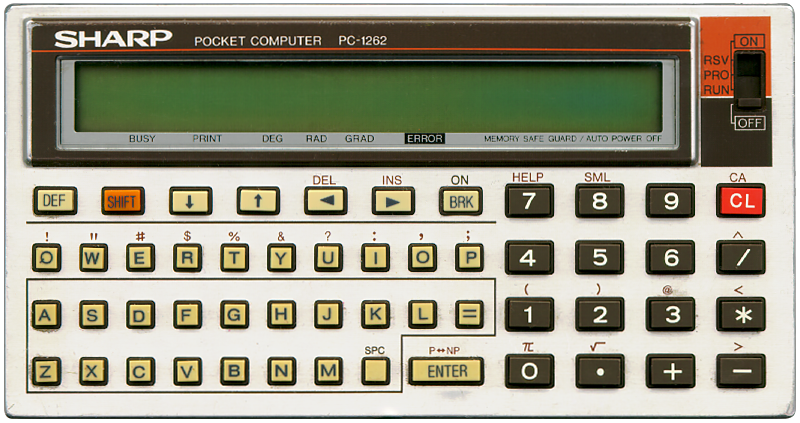
The SHARP PC-1262 is a Pocket Computer programmable in BASIC. it has a two-line display, two lines of 24 5×7 pixel characters. It has a contrast adjustment wheel at the right side. It is basically the same as the SHARP PC-1261 but with different colours.
It has 10.4 KB of RAM. In its default memory configuration there are 9342 programming steps and 26 memories. Memory can be segmented, exchanging 15 programming steps for one extra memory location. When used as a string variable (e.g. AA$) the variable can store 16 alphanumeric characters.
Single character variables can be either a string or a value. For instance, A and A$ can not coexist. A is either a numerical value, or a string using A$. As a string variable only 7 characters are stored.
Its memory is not user expandable.
When I got this SHARP PC-1262 it was somehow set to Japanese mode showing Kana characters when typing and the Kana symbol (カナ) is visible top left when switched on. After resetting it it was back to our usual alphabet. There is also a Japanese version of this Pocket Computer with a カナ function where the SML function is on this version.
This pocket.free.fr page (link validated 2026-08-25) specifies how to switch.
POKE 12349,9 will activate
the Kana keyboard and POKE
12349,0 will revert it back to international.
So, instead of having to reset the calculator after
activating the Kana keyboard, simply write a single line
BASIC program like this:
			65278 END

			65279 " " POKE 12349,10+NOT PEEK 12349: END
It is also possible to enable switching by means of the SML function by issuing
POKE 8252,150 after
powering on, this functionality is however lost after a power cycle.
This can of course also be stored as a DEF SPC
invokable program:
			65278 END

			65279 " " POKE 8252,150: END
Another interesting capability of the PC-126x series of Pocket Computers is something SHARP calls Easy Simulation Programming (ESP).
From its manual:
When performing only calculations, a program can be written in the form of an equation without using the BASIC commands. The result can be easily obtained simply by entering the individual values (calculation values) during execution of the calculation. This section describes how to write and execute a program in the calculation format (easy simulation program).
This works by defining small formulae using the "#" symbol.
When performing only calculations, a program can be written in the form of an equation without using the BASIC commands. The result can be easily obtained simply by entering the individual values (calculation values) during execution of the calculation. This section describes how to write and execute a program in the calculation format (easy simulation program).
An ex example. Enter PRO mode, then type:
#AREA=PI*RADIUS^2
#AREA
It has audio, but only with a beep tone at a fixed frequency using the "BEEP n" command. The number "n" here determines the number of beeps produced.
Machine language programming is also possible thanks to the Pocket Computer’s PEEK, POKE and CALL commands.
All in all a very powerful and capable little Pocket Computer!